


HODL: Coin Tracker
4.4482.00 Reviews
App Specs
- Version
- 9.36
- Updated On
- License
- Free
- Downloads
- 100,000+
- Developer
- HODL Media Inc.
- Categories
- Finance
- Platform
- Android
Screenshots
 Analysis by AppCompare
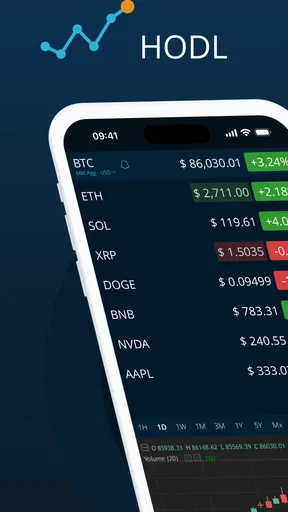
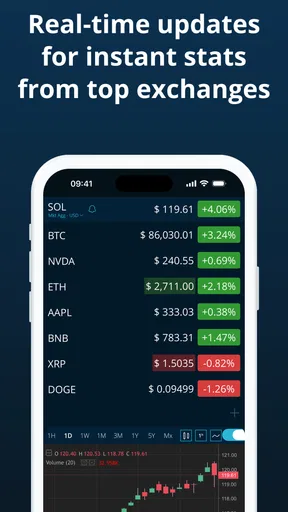
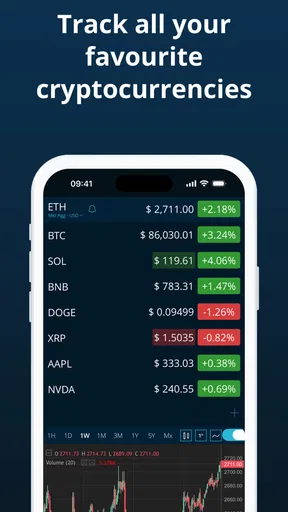
I tend to judge finance apps less by how impressive they look in a store and more by what happens when I open them during a busy moment. With HODL: Coin Tracker, the appeal is clear: it brings cryptocurrency and stock prices into one place, while also putting market news beside the numbers. That combination is useful when I want a quick view of what is moving without jumping between a brokerage app, a crypto exchange, and several news sites.
This is a free finance app from HODL Media Inc., aimed at general users rather than only professional traders. It is available for an Everyone audience, runs on Android versions from 7.0 onward, and has reached over 100 thousand installs. The app’s average rating is 4.4 from around 3.9 thousand ratings, which suggests that many people find the basic idea worthwhile, although a rating alone does not tell you how well it fits your particular investing routine.
My experience is that its value depends heavily on setup. If I treat it as a personal market dashboard and take a few minutes to organize what I actually follow, it becomes much more useful. If I expect it to replace a trading platform, provide a complete research terminal, or remove every bit of market-data confusion, I am likely to be disappointed. That distinction is the key to understanding this app.
Where the first-use experience can become confusing
I find the first-use experience is easiest to judge by asking what I expect the dashboard to do: help me notice what deserves a closer look, rather than make financial decisions for me. In this section, I would focus on the small interpretation traps that can arise when stocks, crypto prices, and headlines sit side by side. That leads naturally to a few setup checks that make the information easier to use.
It is a tracker, not a place to execute trades
The first important expectation check is simple: HODL: Coin Tracker is best approached as an information and monitoring tool. I would use it to watch prices, review news, and keep an eye on a mixed list of assets. I would not open it expecting the same order-entry tools, account controls, or transaction workflow found in a dedicated brokerage or crypto exchange application.
That difference matters in everyday use. Imagine I am commuting home and notice that a stock I follow has moved sharply. This app can help me inspect the current situation and read related coverage in one session. If I then decide to buy or sell, I still need to move to the service where my investment account is held. That extra step is not necessarily a flaw, but it means the app belongs earlier in the decision process rather than at the final execution stage.
Mixed markets need careful interpretation
Combining stocks and cryptocurrencies is convenient, but it also creates a small mental trap. These markets do not behave in exactly the same way. Crypto prices can be watched continuously, while stock activity is tied to market schedules and the conventions of the exchange involved. When both appear in one dashboard, I have to remember that a quiet stock display may reflect market timing rather than a lack of interest.
Worth Reading Before You Choose

EA SPORTS FC Mobile 26 Is a Bigger Football Game, but It Takes Time

Flipboard Shows What News Apps Must Do Beyond the Feed

Switching to Android Auto Means Rethinking Your Driving Routine

Google Calendar Makes a Crowded Week Easier to Manage

Ludo King Makes the Most of the Minutes Between Plans

Baby Panda World Brings Quick Play to Modern Phones, but Its Game Library Feels Busy
The same issue applies to price differences. A cryptocurrency may show slightly different values across exchanges, and a stock quote can depend on the source used for the information. I would avoid treating a displayed figure as the exact amount I could receive in a transaction. For any decision involving real money, I would confirm the figure inside the relevant exchange or brokerage account before acting.
News aggregation saves time but needs judgment
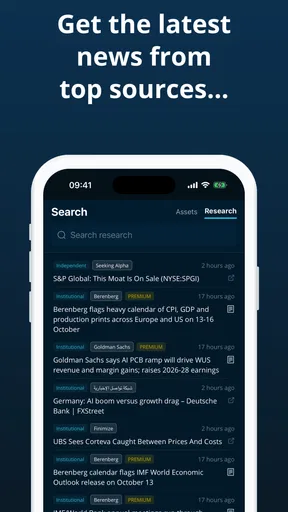
The news side is one of the more useful parts of the concept because it can reduce the need to search for stories manually. I like having market coverage near a watchlist, especially when I am trying to understand why an asset is attracting attention. Still, a collection of headlines is not the same as analysis, and several articles may repeat the same event from different angles.
My practical habit would be to use the news feed as a starting point. I would read beyond the headline, compare more than one source when a story could affect a decision, and separate reporting from speculation. This is particularly important with crypto coverage, where a dramatic title can encourage an emotional response before I have checked the underlying facts.
What I would check before blaming the app
When a price looks wrong or a news item seems missing, I would first check the basics. Is the device connected reliably? Is the asset identified correctly? Am I looking at a market that is currently active or one that is between sessions? Have I compared the displayed value with the source where I would actually trade?
These checks sound obvious, but they prevent a common mistake: assuming the app is malfunctioning when the real issue is timing, source variation, or a misunderstanding of the market. A tracker can be working normally while a quote is delayed, a market is closed, or a story has not yet appeared in the selected news coverage.
Setup checks that make the dashboard more useful
Before relying on any market dashboard, I like to decide which assets I genuinely want to monitor and what I will do when something catches my attention. Here, I would also consider how I distinguish a useful prompt from a signal to act, especially when a headline feels urgent. With that routine in mind, the next section looks at practical ways to make the dashboard clearer and more useful.
Start with a deliberately small watchlist
I would not begin by adding every coin and stock I have ever heard about. A smaller list is easier to read and makes unusual movement stand out. My starting group would contain the assets I genuinely monitor, plus perhaps one or two broader references that help me understand the direction of the market.
This is also a useful test of whether the app fits my habits. If I cannot quickly find the assets I care about or if the display feels crowded, adding more items will not solve the problem. A tracker works best when it answers a narrow question such as, “What needs my attention today?” rather than trying to become a complete archive of every possible market.
Separate observation from action
One of the most practical ways I would use HODL: Coin Tracker is as a pre-trade checkpoint. I can look at the price movement, scan the associated news, and write down why an asset has caught my attention before opening a trading account elsewhere. That short pause helps separate a considered decision from a reaction to a sudden headline.
I would also avoid using a market tracker as a substitute for a personal record. A displayed price tells me what the market information is showing, but it does not automatically explain my purchase price, tax position, risk level, or total exposure. Those details belong in my brokerage records or a separate portfolio process. The app is more valuable when I give it one clear job instead of asking it to manage everything.
Allow time for the information to make sense
When setting up a combined stock-and-crypto dashboard, I would check a few assets at different times of day. That helps reveal how the app feels during active market movement, during quieter periods, and when news is changing quickly. It is better to learn this during ordinary monitoring than during a stressful moment when I am considering a transaction.
I would also keep the app’s current version in mind. The release shown for this product is version 9.36, so the exact arrangement of screens may change as the developer updates it. If a control seems to have moved after an update, I would look through the current interface rather than assuming that an older instruction still applies exactly.
Think carefully about optional spending
The app is free to install, but it includes in-app purchases ranging from $0.99 to $59.99 per item. I would therefore explore the free experience first and decide whether any paid option solves a real problem in my routine. A paid upgrade is only worthwhile if it reduces friction I actually encounter, such as making monitoring more comfortable or improving the way I organize information.
I would not pay simply because a market is moving quickly. A finance app should support a calm process, not encourage impulse spending during a volatile session. Before confirming any purchase, I would check exactly what it changes and whether that change matters to me. Someone who only checks a few prices occasionally may get everything needed without spending anything.
Use the age rating as a suitability signal, not investment advice
The Everyone rating makes the app approachable for a broad audience, including people who are learning how market trackers work. It does not mean that every user is ready to invest, nor does it turn the information into personalized financial guidance. A younger or inexperienced user should still learn the basics of risk, diversification, fees, and loss before acting on any price movement.
For a beginner, I would use the app to build observation skills first. Follow a small group of assets, read the news connected with their movement, and notice how quickly sentiment changes. That is a safer learning workflow than treating a rising number as an automatic reason to buy.
When a screen does not behave as expected
If information does not appear correctly, I would take a measured troubleshooting path. First I would confirm the internet connection, close and reopen the app, and check whether the problem affects one asset or the entire dashboard. If only one item looks unusual, I would verify its name or symbol and compare the quote with another trusted source.
If the issue affects everything, I would check whether the device itself can load other online content. I would also make sure the app is running on a supported Android version and that the installed version is current. These are ordinary checks, but they distinguish a local connection or device problem from a broader data issue without encouraging risky conclusions.
Recovering a disrupted monitoring routine
A useful recovery method is to rebuild the workflow in stages rather than trying to solve everything at once. I would begin with one familiar stock and one familiar cryptocurrency. If both display normally, I would add the rest of the watchlist gradually. This makes it easier to identify whether a particular symbol, market, or selection is creating confusion.
I would then review the news portion separately. If prices are visible but stories are not, I would not immediately assume that the asset has no coverage. News availability can vary by topic and timing. I would use the feed to discover relevant reporting, then verify important claims through the original publication or another reliable source.
For a repeated problem, I would record what happened: the asset involved, the approximate time, whether other information loaded, and what I saw elsewhere. That note is much more useful when contacting HODL Media Inc. than a vague report saying that the app is broken. It also helps me notice whether the issue is actually a recurring market-timing misunderstanding.
When the app is not the cause
Some frustrations come from the market rather than the software. A stock can appear unchanged because its exchange is closed. A cryptocurrency can show a different value from another service because the two services use different market sources. A headline may arrive after the price has already reacted, or the price may move before the explanation becomes clear.
This is why I would never use a single displayed number as my only confirmation before placing an order. The final check belongs in the account where the transaction will happen, including the current quote, available balance, fees, and order details. HODL: Coin Tracker can help me decide what deserves investigation, but it should not be the sole authority for a time-sensitive financial action.
There is another important limitation: a combined tracker can show information without giving me the full context of my personal portfolio. It may help me see that several assets are moving, but it does not automatically tell me whether my overall exposure is too concentrated or whether a particular decision fits my financial goals. For that, I need account records and a plan outside the app.
How it compares with the usual alternatives
Compared with a brokerage app, HODL: Coin Tracker is more appealing when I want a neutral monitoring space for both stocks and crypto. A brokerage application is usually the better destination for account-specific balances, order placement, and transaction records. If my main purpose is trading rather than watching, I would choose the brokerage first and treat this app as optional.
Compared with a dedicated crypto exchange, HODL: Coin Tracker is more convenient for a mixed overview. An exchange is generally the natural place to manage crypto positions and execute orders, while this app is useful when I want crypto to sit beside stocks and related news. The trade-off is specialization: the exchange may be more suitable for detailed crypto operations, while HODL offers a broader monitoring perspective.
Compared with a general news reader, the app has a stronger connection between market topics and the assets I follow. That saves me from searching manually, but it also means I should not mistake convenience for complete coverage. A news reader or direct publication may still be better when I need deep background, long-form reporting, or a wider view beyond the assets already on my radar.
Who will get the most from it
I think this app is a good fit for someone who follows a mixture of stocks and cryptocurrencies and wants a lightweight place to check prices and news. It also suits a beginner who wants to observe markets before committing to a complicated analytical platform. The simple daily routine is attractive: open the dashboard, review meaningful changes, read the most relevant coverage, and then decide whether any further research is justified.
It can also help an experienced investor who already has a separate execution platform but wants a quick cross-market glance. In that role, its strength is convenience rather than depth. I would use it as a first screen in the morning or a quick check before researching a company or coin elsewhere.
Who should skip it
I would skip it if I need advanced charting, detailed portfolio accounting, tax reporting, or direct order execution in one place. It is also not the right choice for someone who wants a single quote treated as a guaranteed real-time trading price. In those cases, a dedicated brokerage, exchange, portfolio manager, or professional market-data service is likely to be a better match.
I would also be cautious if market movement tends to make me act impulsively. Having prices and news together can be convenient, but it can also make it easier to react to every change. If I use the app, I would pair it with a written investing plan and decide in advance what information is important enough to act on.
My practical verdict
HODL: Coin Tracker succeeds when I use it for what it does best: bringing a mixed watchlist and market news into a convenient monitoring workflow. Its free entry point makes it easy to try, and the broad Everyone rating makes it approachable for casual users and learners. The developer, HODL Media Inc., has built an app that is more useful as a daily information companion than as a complete financial command center.
The main friction is not necessarily opening the app; it is interpreting what I see. Quotes can differ by source, stock activity depends on market timing, and headlines need context. Once I accept those limits, the workflow becomes straightforward: keep the watchlist focused, use news as a research prompt, verify important figures where I would trade, and avoid confusing a tracker with a financial plan.
My recommendation is therefore conditional but positive. If you want a simple way to watch stocks and crypto together, this is worth trying before considering any optional purchase. If you need execution tools or deep portfolio analysis, use a specialized alternative instead. The best use of HODL: Coin Tracker is as a calm first stop before a financial decision, not the final word on what that decision should be.
Pros
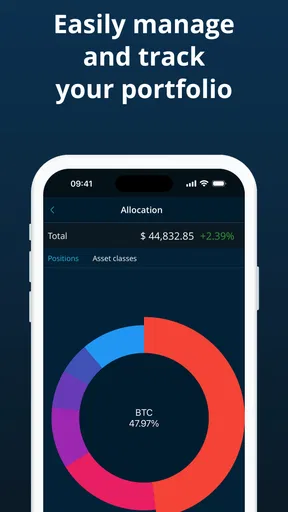
- Supports tracking multiple cryptocurrencies in one portfolio.
- Clean interface makes checking holdings quick and straightforward.
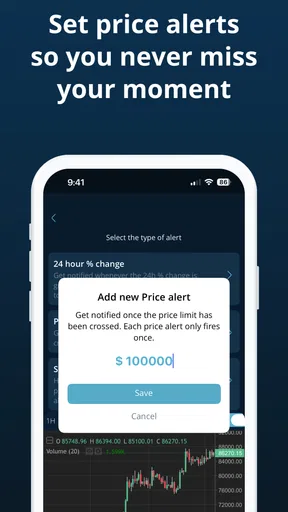
- Useful price updates help monitor market movements on the go.
- Portfolio overview can simplify tracking overall investment performance.
- Lightweight design should run well on most modern Android and iOS devices.
Cons
- Market data may occasionally differ between exchanges.
- Advanced trading and order features are not included.
- Limited functionality for users needing detailed technical analysis.
- Crypto prices can change rapidly
- making displayed values easy to outdate.
- Portfolio tracking still requires manually entering some transactions.
FAQs for HODL: Coin Tracker
What is HODL: Coin Tracker used for?
HODL: Coin Tracker is designed to help cryptocurrency users monitor their portfolios and follow coin prices in one place. After adding your holdings, you can review estimated balances, track performance, and observe market movements without constantly switching between exchange apps and websites. It is primarily a tracking and organization tool, not a wallet or trading platform for buying and selling assets.
Does HODL: Coin Tracker connect directly to my exchange or wallet?
The way portfolio data is added depends on the app’s available features and your chosen setup. Some users may enter transactions or holdings manually, while other versions may offer integrations for importing information. Before granting access, check exactly what permissions are requested. A tracker should not require your private keys or recovery phrase, and you should never share those sensitive credentials with any app.
Is HODL: Coin Tracker suitable for beginners?
Yes, the app can be useful for beginners who want a simpler overview of their cryptocurrency holdings instead of relying on complicated exchange dashboards. Its main benefit is presenting portfolio information and market prices in a more convenient format. However, new users should understand basic terms such as cost basis, profit and loss, market value, and price volatility before making financial decisions based on the displayed information.
Can I use HODL: Coin Tracker to buy or sell cryptocurrency?
HODL: Coin Tracker should be treated as a portfolio-monitoring application rather than a complete cryptocurrency exchange. Tracking prices and portfolio performance does not necessarily mean that the app can execute trades, transfer coins, or store digital assets. If trading is supported through an external service, review the destination, fees, and security requirements carefully. Always confirm transactions in the official exchange or wallet interface.
Is the information in HODL: Coin Tracker accurate and safe to rely on?
The app can provide a convenient snapshot of cryptocurrency prices and portfolio values, but figures may vary depending on the data source, update frequency, currency settings, and manually entered transactions. Cryptocurrency prices change rapidly, so displayed values may not match the exact amount available on an exchange. Use the app for monitoring and organization, while verifying important balances and transactions through official financial platforms.


